List of employees for example. Quick way to find duplicate values using LAG windowing function
;with c as (
SELECT [FirstName]
,[LastName],
[FirstName] + ' ' + [LastName] x
,[StaffNumber]
FROM Employee
),
cc as(
SELECT FirstName, LastName, StaffNumber, x , lag (x) over (partition by LastName order by x) dup
from c)
select FirstName, LastName, StaffNumber, x , dup From cc
where x=dup
order by LastName
Wednesday, 6 June 2018

Thursday, 24 May 2018
Count Distinct Over Partition
To get a count of distinct values over a windowing partition:
DENSE_RANK() OVER (PARTITION BY e.Dept_Desc order by e.Staff_No)
+ DENSE_RANK() OVER (PARTITION BY e.Dept_Desc order by e.Staff_No desc)
- 1
DENSE_RANK() OVER (PARTITION BY e.Dept_Desc order by e.Staff_No)
+ DENSE_RANK() OVER (PARTITION BY e.Dept_Desc order by e.Staff_No desc)
- 1
Friday, 1 September 2017
Using javascript to encode a URL with an ampersand
javascript escape function:
="javascript:void(window.open('http://xxx/reportserver?/Folder A/Report X" & "&rs:Command=Render" & "&rc:Parameters=true" & "¶m1="
& replace(
Fields!description.Value, "&", "'+escape('&')+'"
)
& "'));"
="javascript:void(window.open('http://xxx/reportserver?/Folder A/Report X" & "&rs:Command=Render" & "&rc:Parameters=true" & "¶m1="
& replace(
Fields!description.Value, "&", "'+escape('&')+'"
)
& "'));"
Tuesday, 23 May 2017
SSRS chart display % on labels issue
SSRS chart display % on labels issue
To show percentage symbol after a literal value:
Chart series label - Properties
Format = 0\% or 0.00\% (depending on no. of dec. places reqd)
To show percentage symbol after a literal value:
Chart series label - Properties
Format = 0\% or 0.00\% (depending on no. of dec. places reqd)
Monday, 13 February 2017
ssrs url javascript
="Javascript:"
    & IIF(left(Fields!Name.Value,11)="RESTRICTED-",
        "alert('Restricted!'); ","") & IIF(Fields!Name_Alert.Value = 1, "alert('Alternate Alert!'); ","")
    & "void(window.open('"
    & Globals!ReportServerUrl
    & "/Pages/ReportViewer.aspx?%2fJPD%2fPO_Dashboard%2fJuvenile_Profile&rs:Command=Render"
    & "&rc:Parameters=true"
    & "&Emp_Number="
    & Parameters!Param1.Value
    & “&ID=" & Fields!ID.Value & "'));"
http://stackoverflow.com/questions/18003013/open-ssrs-url-in-new-window
=iif(
COUNT(Fields!ABC.Value)>0,
"javascript:void(window.open('http://XXX/reportserver?/my Reports/this report"
& "&rs:Command=Render"
& "&rc:Parameters=true"
& "&p1=" & Parameters!p1.Value
& "&f1=" & Fields!f1.Value
& "&f2" & Fields!f2.Value &
"'));",NOTHING)
URL encoding
Replace(Fields!myfield.Value,"&","' + escape('&') + '")
https://social.msdn.microsoft.com/Forums/sqlserver/en-US/6462b0f6-d784-4c7a-afe0-2813bec5770a/url-action-with-javascript-and-ssas-parameter?forum=sqlreportingservices
Tuesday, 11 October 2016
SSRS custom sort
Public Function CustomSortOrder(ByVal RAG As String) as Integer
Select Case RAG
Case = "Up to 6 month"
Return 1
Case = "7 to 12 months"
Return 2
Case = "More than 12 months"
Return 3
End Select
End Function
=Code.CustomSortOrder(Fields!RAG.Value)
Select Case RAG
Case = "Up to 6 month"
Return 1
Case = "7 to 12 months"
Return 2
Case = "More than 12 months"
Return 3
End Select
End Function
=Code.CustomSortOrder(Fields!RAG.Value)
Thursday, 30 June 2016
ssrs subreport background colour
Ssubreport properties.
Select Parameters and add a parameter.
The name column is the name of the parameter in the subreport (rowcolour) and value is the value to set it to.
Set Value to the same expression used to set the background color for the row.
background color =Parameters!rowcolour.Value into the expression builder.
Select Parameters and add a parameter.
The name column is the name of the parameter in the subreport (rowcolour) and value is the value to set it to.
Set Value to the same expression used to set the background color for the row.
background color =Parameters!rowcolour.Value into the expression builder.
Monday, 20 April 2015
combine multiple rows into one
LEFT OUTER JOIN (
SELECT ref, STUFF
((SELECT ' ' +
com_text
FROM comm
WHERE ref = q1.ref
ORDER BY comseq ASC
FOR XML PATH('')), 1, 1, '') [Comments]
FROM comm AS q1
GROUP BY ref
) AS Comm ON Comm.ref = x.ref
SELECT ref, STUFF
((SELECT ' ' +
com_text
FROM comm
WHERE ref = q1.ref
ORDER BY comseq ASC
FOR XML PATH('')), 1, 1, '') [Comments]
FROM comm AS q1
GROUP BY ref
) AS Comm ON Comm.ref = x.ref
Tuesday, 6 May 2014
Green bar for a group header - SSRS
=IIF(RunningValue(Fields!xxx.Value,COUNTDISTINCT,NOTHING) MOD 2 = 1,
"White","PaleGreen")
=iif(RunningValue(Fields!xxx. Value,CountDistinct,"parentgroupname") Mod 2,"WhiteSmoke","White")
Tuesday, 24 December 2013
List all Stored Procedures within a db - SQL
SELECT
*
FROM
TFSheffieldNew.INFORMATION_SCHEMA.ROUTINES
WHERE
(ROUTINE_TYPE = 'PROCEDURE')
*
FROM
TFSheffieldNew.INFORMATION_SCHEMA.ROUTINES
WHERE
(ROUTINE_TYPE = 'PROCEDURE')
Monday, 28 October 2013
Auxiliary Numbers Table - Populated by CTE (Based on Itzik Ben-Gan)
USE [Auxiliary]
GO
SET ANSI_NULLS ON
GO
SET QUOTED_IDENTIFIER ON
GO
CREATE TABLE [dbo].[Nums]
([n] [int] NOT NULL, PRIMARY KEY CLUSTERED
([n] ASC ))
GO
;WITH x00(n) AS (SELECT 1 UNION ALL SELECT 1),
x02 (n) AS (SELECT 1 FROM x00 a, x00 b),
x04 (n) AS (SELECT 1 FROM x02 a, x02 b),
x08 (n) AS (SELECT 1 FROM x04 a, x04 b),
x16 (n) AS (SELECT 1 FROM x08 a, x08 b),
x32 (n) AS (SELECT 1 FROM x16 a, x16 b),
cTally (n) AS (SELECT ROW_NUMBER() OVER (ORDER BY n) FROM x32)
INSERT INTO Nums(n)
SELECT * from cTally
WHERE n <= 1000000;
GO
Based on the CTE used here:
http://sqlreportingservicescrystalreports.blogspot.co.uk/2009/12/auxilary-cte-of-numbers-sql.html
GO
SET ANSI_NULLS ON
GO
SET QUOTED_IDENTIFIER ON
GO
CREATE TABLE [dbo].[Nums]
([n] [int] NOT NULL, PRIMARY KEY CLUSTERED
([n] ASC ))
GO
;WITH x00(n) AS (SELECT 1 UNION ALL SELECT 1),
x02 (n) AS (SELECT 1 FROM x00 a, x00 b),
x04 (n) AS (SELECT 1 FROM x02 a, x02 b),
x08 (n) AS (SELECT 1 FROM x04 a, x04 b),
x16 (n) AS (SELECT 1 FROM x08 a, x08 b),
x32 (n) AS (SELECT 1 FROM x16 a, x16 b),
cTally (n) AS (SELECT ROW_NUMBER() OVER (ORDER BY n) FROM x32)
INSERT INTO Nums(n)
SELECT * from cTally
WHERE n <= 1000000;
GO
Based on the CTE used here:
http://sqlreportingservicescrystalreports.blogspot.co.uk/2009/12/auxilary-cte-of-numbers-sql.html
Monday, 28 January 2013
To obtain SQL Server 2008R2 Product Key
To obtain SQL Server 2008R2 Product Key:
USE MASTER
GO
EXEC XP_REGREAD 'HKEY_LOCAL_MACHINE','SOFTWARE\Microsoft\Microsoft SQL Server\100\BIDS\Setup','ProductCode'
GO
USE MASTER
GO
EXEC XP_REGREAD 'HKEY_LOCAL_MACHINE','SOFTWARE\Microsoft\Microsoft SQL Server\100\BIDS\Setup','ProductCode'
GO
Tuesday, 20 November 2012
Convert time to string - SQL
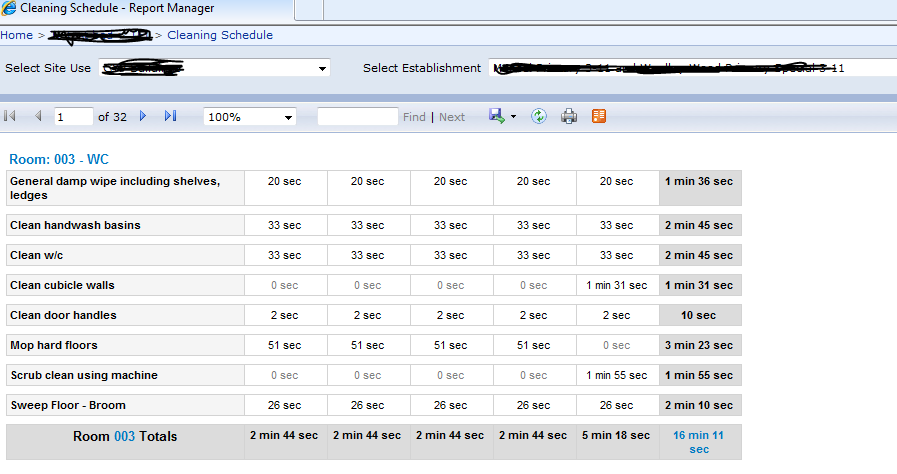
Scenario where a db field contains seconds, the user wanted a SSRS report displaying various aggregates of the seconds field as Hours - Minutes - Seconds.
IFOBJECT_ID('dbo.udf_SCC_TimeToString') IS NOT NULL
DROP FUNCTION dbo.udf_SCC_TimeToString ;
GO
CREATEFUNCTION dbo.udf_SCC_TimeToString
(
@timesec INT) --input in seconds as integer
RETURNSVARCHAR(25)
/*==========================================
Dom Horton
17/10/2012
==========================================*/
AS
BEGIN
DECLARE
@return
AS VARCHAR(25),
@a AS INT,
@b AS INT,
@hours AS INT,
@mins AS INT,
@secs AS INT;
SET@a = @timesec%3600 --get no. of seconds over the hour
SET@hours = (@timesec - @a)/3600 --get no. of seconds of completed hours, divide by hour in seconds to get completed hours
SET@b = @a --hold no. of secs over the hour
SET@a = @b%60--get no. of secs over the min
SET@mins = (@b - @a)/60 --get no. of seconds of completed mins, divide by min in secs to get completed minutes
SET@secs = @a
SET@return =
CASE
WHEN @timesec >=3600
THEN
convert(varchar(10),@hours) + ' hr ' +
convert(varchar(10),@mins) + ' min ' +
convert(varchar(10),@secs) + ' sec '
WHEN @timesec >=60
THEN
convert(varchar(10),@mins) + ' min ' +
convert(varchar(10),@secs) + ' sec '
ELSE
convert(varchar(10),@secs) + ' sec '
END;
RETURN
@return
END
Example below showing the Stored Procedure in use:
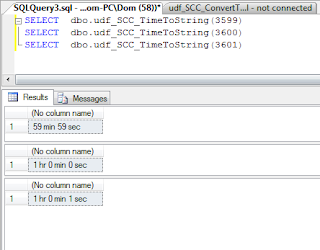
and in use in a SSRS report:

IFOBJECT_ID('dbo.udf_SCC_TimeToString') IS NOT NULL
DROP FUNCTION dbo.udf_SCC_TimeToString ;
GO
CREATEFUNCTION dbo.udf_SCC_TimeToString
(
@timesec INT) --input in seconds as integer
RETURNSVARCHAR(25)
/*==========================================
Dom Horton
17/10/2012
==========================================*/
AS
BEGIN
DECLARE
@return
AS VARCHAR(25),
@a AS INT,
@b AS INT,
@hours AS INT,
@mins AS INT,
@secs AS INT;
SET@a = @timesec%3600 --get no. of seconds over the hour
SET@hours = (@timesec - @a)/3600 --get no. of seconds of completed hours, divide by hour in seconds to get completed hours
SET@b = @a --hold no. of secs over the hour
SET@a = @b%60--get no. of secs over the min
SET@mins = (@b - @a)/60 --get no. of seconds of completed mins, divide by min in secs to get completed minutes
SET@secs = @a
SET@return =
CASE
WHEN @timesec >=3600
THEN
convert(varchar(10),@hours) + ' hr ' +
convert(varchar(10),@mins) + ' min ' +
convert(varchar(10),@secs) + ' sec '
WHEN @timesec >=60
THEN
convert(varchar(10),@mins) + ' min ' +
convert(varchar(10),@secs) + ' sec '
ELSE
convert(varchar(10),@secs) + ' sec '
END;
RETURN
@return
END
Example below showing the Stored Procedure in use:

and in use in a SSRS report:
Thursday, 6 September 2012
Missing indexes - SQL
SELECT index_handle, database_id, object_id, equality_columns, inequality_columns, included_columns, statement
FROM sys.dm_db_missing_index_details
FROM sys.dm_db_missing_index_details
Index usage - SQL
SELECT OBJECT_NAME(I.object_id) AS TableName, I.name, I.index_id, I.type_desc, I.is_unique,
I.fill_factor, I.is_padded, I.is_disabled, I.is_hypothetical,
IUS.index_id , IUS.user_seeks, IUS.user_scans, IUS.user_lookups, IUS.user_updates, IUS.last_user_seek,
IUS.last_user_scan, IUS.last_user_lookup, IUS.last_user_update, IUS.system_seeks, IUS.system_scans, IUS.system_lookups, IUS.system_updates,
IUS.last_system_seek, IUS.last_system_scan, IUS.last_system_lookup, IUS.last_system_update
FROM sys.indexes AS I LEFT OUTER JOIN
sys.dm_db_index_usage_stats AS IUS
ON I.object_id = IUS.object_id AND
I.index_id = IUS.index_id
ORDER BY OBJECT_NAME(I.object_id)
I.fill_factor, I.is_padded, I.is_disabled, I.is_hypothetical,
IUS.index_id , IUS.user_seeks, IUS.user_scans, IUS.user_lookups, IUS.user_updates, IUS.last_user_seek,
IUS.last_user_scan, IUS.last_user_lookup, IUS.last_user_update, IUS.system_seeks, IUS.system_scans, IUS.system_lookups, IUS.system_updates,
IUS.last_system_seek, IUS.last_system_scan, IUS.last_system_lookup, IUS.last_system_update
FROM sys.indexes AS I LEFT OUTER JOIN
sys.dm_db_index_usage_stats AS IUS
ON I.object_id = IUS.object_id AND
I.index_id = IUS.index_id
ORDER BY OBJECT_NAME(I.object_id)
Wednesday, 8 August 2012
Useful SSRS expression syntax
=IIF(Fields!a.value>100, True, False)
--------------------------------------------------------
=IIF(Fields!a.value >=10, "Green", IIF(Fields!a.value >=1, "Blue", "Red"))
values >=10 are green, between 1 & 9 are blue, less than 1 are red
--------------------------------------------------------
=SWITCH(
Fields!a.value >=10, "green",
Fields!a.value >=1, "blue",
Fields!a.value = 1, "yellow",
Fields!a.value <=0, "Red")
>=10 are green, between 1 & 9 blue, =1 yellow, <=0 red
--------------------------------------------------------
SWITCH function finds the first expression that's true. It will not catch errors further along.
IIF function evaluates all parts of the expression.
--------------------------------------------------------
=IIF(Rownumber("scope") Mod 2 = 0, "Khaki", "White")
set "scope" to reset row colours for every group
--------------------------------------------------------
--------------------------------------------------------
=IIF(Fields!a.value >=10, "Green", IIF(Fields!a.value >=1, "Blue", "Red"))
values >=10 are green, between 1 & 9 are blue, less than 1 are red
--------------------------------------------------------
=SWITCH(
Fields!a.value >=10, "green",
Fields!a.value >=1, "blue",
Fields!a.value = 1, "yellow",
Fields!a.value <=0, "Red")
>=10 are green, between 1 & 9 blue, =1 yellow, <=0 red
--------------------------------------------------------
SWITCH function finds the first expression that's true. It will not catch errors further along.
IIF function evaluates all parts of the expression.
--------------------------------------------------------
=IIF(Rownumber("scope") Mod 2 = 0, "Khaki", "White")
set "scope" to reset row colours for every group
--------------------------------------------------------
Thursday, 6 October 2011
Using Count function on a uniqueidentifier field - SQL
SELECT COUNT(D.DOCUMENTID) AS DocCount, P.TITLE
FROM DOCUMENT AS D inner join
PROJECT AS P ON D.PROJECTID = P.PROJECTID
GROUP BY P.PROJECTID, P.TITLE
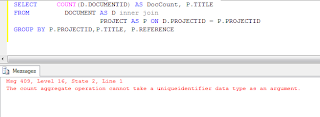
When running this query I encountered the following error:
Msg 409, Level 16, State 2, Line 1
The count aggregate operation cannot take a uniqueidentifier data type as an argument.
To avoid this error when trying to Count a uniqueidetifier field you have to CAST it into a char :
SELECT COUNT(CAST(D.DOCUMENTID AS char(36))) AS DocCount, P.TITLE
FROM DOCUMENT AS D inner join
PROJECT AS P ON D.PROJECTID = P.PROJECTID
GROUP BY P.PROJECTID, P.TITLE

FROM DOCUMENT AS D inner join
PROJECT AS P ON D.PROJECTID = P.PROJECTID
GROUP BY P.PROJECTID, P.TITLE
When running this query I encountered the following error:
Msg 409, Level 16, State 2, Line 1
The count aggregate operation cannot take a uniqueidentifier data type as an argument.

To avoid this error when trying to Count a uniqueidetifier field you have to CAST it into a char :
SELECT COUNT(CAST(D.DOCUMENTID AS char(36))) AS DocCount, P.TITLE
FROM DOCUMENT AS D inner join
PROJECT AS P ON D.PROJECTID = P.PROJECTID
GROUP BY P.PROJECTID, P.TITLE

Thursday, 29 September 2011
A3 Landscape dashboard layout - SSRS
For A3 Landscape dashboard style settings:
Report Properties:
Grid Spacing 0.2cm
InteractiveSize
Width 42cm
Height 0cm
Margin all 0.5cm
PageSize
Width 42cm
Height 29.7cm
Body Properties:
Size
Width 41cm
Height 28.7cm
Report Properties:
Grid Spacing 0.2cm
InteractiveSize
Width 42cm
Height 0cm
Margin all 0.5cm
PageSize
Width 42cm
Height 29.7cm
Body Properties:
Size
Width 41cm
Height 28.7cm
Subscribe to:
Posts (Atom)