I've been recently attempting to imrpove the performance of a number of 'legacy' Crystal Reports. One in question contained approximately 7 subreports with the main report returning 300+ records. I saw this an ideal candidate for using solely a SQL command.
I'd re-written the Crystal using said SQL command and then compared the performance of both existing subreport and new SQL command versions using SQL Server Profiler.
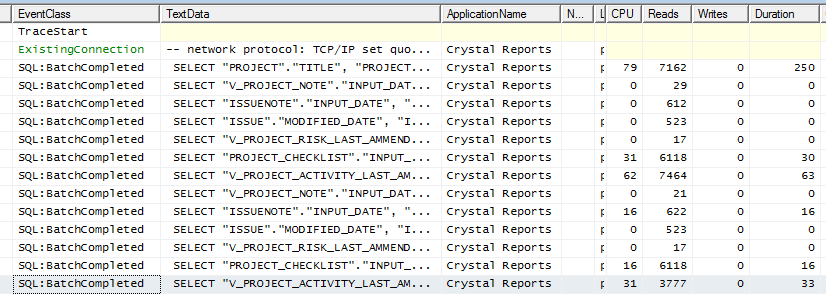
The first image shows the existing subreport version:
The second shows the SQL command version:

I was surprised to see the values returned by the SQL command version which seemed vastly larger than the sum of all the 'subreport' performance values. But, on closer inspection I realised that the subreport was only returning data for the first page in Crystal Reports whereas the SQL version was gleaning all the database info in 1 go.
The below image shows the performance of the subreport version when the user refreshes the report on page one and subsequently moves to page two (page one returns two main report rows whereas page report returns three).
As this report contains over 70 pages it is plain to see that using the subreport version the database would be queried multiple times and incur all the related network traffic. It is thus beneficial to go with the SQL command version (as originally expected!). Summing up all the CPU and read and writes also confirms this.
One concern that I've been unable to resolve is that Crystal Report seems to create two SQL batches when using a SQL command thus doubling the performance overheads. The same query when run in SQL Server Management Studio records only 1 SQL batch as expected. I need to look into this as I'm not fully sure why this is occuring.
Showing posts with label Crystal Reports. Show all posts
Tuesday, 16 August 2011
Friday, 3 June 2011
Using SQL commands, parameters and subreports - CR
My report contains a number of subreports, each comprising a SQL command and using a parameter value passed from the main report.
1) Set up the main report parameter, in this instance called ?School
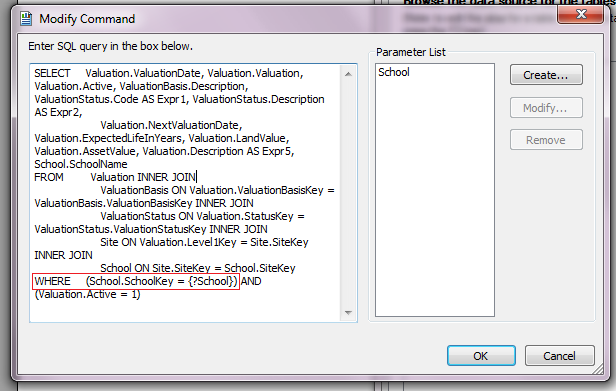
2) Add a subreport, Add Command with the Where clause as follows:
WHERE (School.SchoolKey = {?School})
3) For the Parameter list, Click Create:
Parameter Name = School
Value Type = Number
It will then prompt for a parameter value, enter 1 (anything will suffice at this stage)
NOTE: When the database field is a uniqueidentifier, use 'String' type and for the prompt use a value in the uniqueidenfier format: {29D2B899-393A-4592-9B00-D289884A1F94}
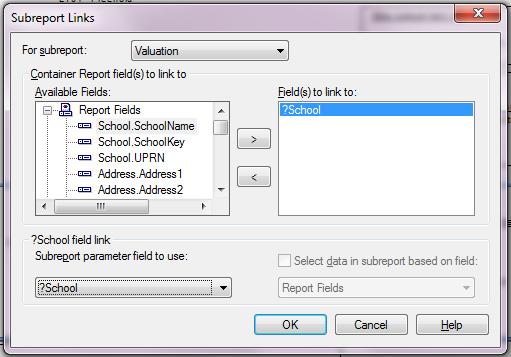
4) Back in the main report, right click the subreport and Change Subreport Links:
Available Fields = ?School
Subreport parameter field to use = ?School (make sure to select the user-generated one and not the automatically generated one named similar to ?PM-?School)
5) Voila! Main report parameters should now be passed to SQL Commands in subreports.
1) Set up the main report parameter, in this instance called ?School
2) Add a subreport, Add Command with the Where clause as follows:
WHERE (School.SchoolKey = {?School})
3) For the Parameter list, Click Create:
Parameter Name = School
Value Type = Number
It will then prompt for a parameter value, enter 1 (anything will suffice at this stage)
NOTE: When the database field is a uniqueidentifier, use 'String' type and for the prompt use a value in the uniqueidenfier format: {29D2B899-393A-4592-9B00-D289884A1F94}
4) Back in the main report, right click the subreport and Change Subreport Links:
Available Fields = ?School
Subreport parameter field to use = ?School (make sure to select the user-generated one and not the automatically generated one named similar to ?PM-?School)
5) Voila! Main report parameters should now be passed to SQL Commands in subreports.
Labels:
Add Command,
CR,
Crystal Reports,
Parameter,
SQL Commands,
Subreport,
uniqueidentifier
Wednesday, 24 November 2010
Create a CTE list of dates on the fly - SQL
CTE list of dates on the fly:
WITH D AS
(
SELECT number AS rn FROM master.dbo.spt_values
WHERE type = 'P' AND number BETWEEN 0 AND 29
)
SELECT DATEADD(dd, -D.rn, DATEADD(dd, DATEDIFF(dd,0,GETDATE()), 0)) AS ReportDate
FROM D;
2000/pre CTE solution here
WITH D AS
(
SELECT number AS rn FROM master.dbo.spt_values
WHERE type = 'P' AND number BETWEEN 0 AND 29
)
SELECT DATEADD(dd, -D.rn, DATEADD(dd, DATEDIFF(dd,0,GETDATE()), 0)) AS ReportDate
FROM D;
2000/pre CTE solution here
Labels:
Auxiliary,
Crystal Reports,
CTE,
DateAdd,
DateDiff,
Dates,
GetDate,
List of dates,
Missing Dates
Tuesday, 23 November 2010
Create a list of dates on the fly - SQL
I've recently had the requirement to produce a list of the last 30 days on the fly (I didn't have the option to refer to a 'Numbers' table). This was to be used as a 'Command' in Crystal Reports and joined to a database table to produce 'missing dates'.
Using the system table, spt_values, the first stage was to produce a list of numbers:
SELECT number AS rn FROM master.dbo.spt_values
WHERE type = 'P' AND number BETWEEN 0 AND 29
This is then extended to produce a list of the last 30 dates.
SELECT DATEADD(dd, -D.rn, DATEADD(dd, DATEDIFF(dd,0,GETDATE()), 0)) AS ReportDate
FROM (
SELECT number AS rn FROM master.dbo.spt_values
WHERE type = 'P' AND number BETWEEN 0 AND 29
) AS D
This was with help from both Chris Morris & Kevin McKelvey at http://www.sqlservercentral.com/
CTE solution here
Using the system table, spt_values, the first stage was to produce a list of numbers:
SELECT number AS rn FROM master.dbo.spt_values
WHERE type = 'P' AND number BETWEEN 0 AND 29
This is then extended to produce a list of the last 30 dates.
SELECT DATEADD(dd, -D.rn, DATEADD(dd, DATEDIFF(dd,0,GETDATE()), 0)) AS ReportDate
FROM (
SELECT number AS rn FROM master.dbo.spt_values
WHERE type = 'P' AND number BETWEEN 0 AND 29
) AS D
This was with help from both Chris Morris & Kevin McKelvey at http://www.sqlservercentral.com/
CTE solution here
Labels:
Auxiliary,
Crystal Reports,
DateAdd,
DateDiff,
Dates,
GetDate,
List of dates,
Missing Dates,
SQL
Monday, 12 July 2010
Crystal Reports rebranded
SAP have recently announced that Crystal Reports is to be rebranded as SAP Crystal Reports, hopefully ensuring their long term commitment to the product. Various new products are also in the pipeline. Further details here
Monday, 28 June 2010
Group Header continued... - CR
To display 'continued' or similar when a group continues onto a new page, firstly ensure Repeat Group Header is checked in Group Expert then add the following formula to the Group Header:
IF InRepeatedGroupHeader THEN {?School} & " continued"
ELSE {?School}
IF InRepeatedGroupHeader THEN {?School} & " continued"
ELSE {?School}
Wednesday, 5 May 2010
Nth largest value - SSRS
I recently had a query regarding replicating Crystal Reports nth largest functionality in Reporting Services (hope this helps, Andy!).
For example, In Crystal Reports, its simply a case of using Insert>>Summary
I believe the most efficient way to go about is to use a subquery in T-SQL and incorporate into a dataset.
Using the AdventureWorks db, the first query uses the ROW_NUMBER function to sequentially order rows, purely for this examples sake. (ROW_NUMBER is only available in SQL Server 2005 onwards)
SELECT SalesPersonID, SalesYTD, ROW_NUMBER() OVER(ORDER BY SalesYTD desc) as rownum
FROM AdventureWorks.Sales.SalesPerson
The second query, using a subquery, firstly selects the top 3 SalesYTD values and then selects the smallest of these 3, the third largest of all values.
SELECT TOP 1 SalesPersonID, SalesYTD FROM
(SELECT TOP 3 SalesPersonID, SalesYTD FROM AdventureWorks.Sales.SalesPerson ORDER BY SalesYTD desc) as Sales
ORDER BY SalesYTD asc
By simply replacing the 3 in the subquery by n, the nth largest value can be obtained.
For example, In Crystal Reports, its simply a case of using Insert>>Summary
I believe the most efficient way to go about is to use a subquery in T-SQL and incorporate into a dataset.
Using the AdventureWorks db, the first query uses the ROW_NUMBER function to sequentially order rows, purely for this examples sake. (ROW_NUMBER is only available in SQL Server 2005 onwards)
SELECT SalesPersonID, SalesYTD, ROW_NUMBER() OVER(ORDER BY SalesYTD desc) as rownum
FROM AdventureWorks.Sales.SalesPerson
The second query, using a subquery, firstly selects the top 3 SalesYTD values and then selects the smallest of these 3, the third largest of all values.
SELECT TOP 1 SalesPersonID, SalesYTD FROM
(SELECT TOP 3 SalesPersonID, SalesYTD FROM AdventureWorks.Sales.SalesPerson ORDER BY SalesYTD desc) as Sales
ORDER BY SalesYTD asc
By simply replacing the 3 in the subquery by n, the nth largest value can be obtained.
Friday, 9 April 2010
Useful Character code chart
Here's a link to a useful character code chart:
http://tlt.its.psu.edu/suggestions/international/bylanguage/mathchart.html
and to get the Windows Character Map Utility:
Start>>Programs>>Accessories>>System Tools
and simply copy and paste the relevant character or obtain the unicode number from the keystoke value, where applicable, or convert the hex to decimal.
Hexadecimal to decimal converter:
http://easycalculation.com/hex-converter.php
http://tlt.its.psu.edu/suggestions/international/bylanguage/mathchart.html
and to get the Windows Character Map Utility:
Start>>Programs>>Accessories>>System Tools
and simply copy and paste the relevant character or obtain the unicode number from the keystoke value, where applicable, or convert the hex to decimal.
Hexadecimal to decimal converter:
http://easycalculation.com/hex-converter.php
Labels:
Char,
Character Codes,
Chr,
CR,
Crystal Reports,
decimal,
hexadecimal,
SQL,
SQL Server Reporting Services,
Unicode
Array example - Crystal
Local Numbervar counter := 1;
Local Stringvar Array taskdates;
Local Datetimevar dates := CurrentDate;
Local Datetimevar finishdate := DateAdd("yyyy",5,CurrentDate);
Local Stringvar returnstring;
Do
(
//set array size to counter, initally 1, preserving previous size and values
Redim Preserve taskdates[counter];
//assign dates value, initially CurrentDate to array element numbered counter, initially 1
taskdates[counter] := ToText(dates, "dd-MMM-yyyy");
//increment date variable by 1 year
dates := DateAdd("yyyy",1,dates);
//increment counter by 1
counter := counter+1;
)
//continue do loop while date variable is less than or equal to finishdate
While dates <= finishdate ;
returnstring := Join(taskdates, Chr(13))
Local Stringvar Array taskdates;
Local Datetimevar dates := CurrentDate;
Local Datetimevar finishdate := DateAdd("yyyy",5,CurrentDate);
Local Stringvar returnstring;
Do
(
//set array size to counter, initally 1, preserving previous size and values
Redim Preserve taskdates[counter];
//assign dates value, initially CurrentDate to array element numbered counter, initially 1
taskdates[counter] := ToText(dates, "dd-MMM-yyyy");
//increment date variable by 1 year
dates := DateAdd("yyyy",1,dates);
//increment counter by 1
counter := counter+1;
)
//continue do loop while date variable is less than or equal to finishdate
While dates <= finishdate ;
returnstring := Join(taskdates, Chr(13))
Subscribe to:
Posts (Atom)