SELECT OBJECT_NAME(I.object_id) AS TableName, I.name, I.index_id, I.type_desc, I.is_unique,
I.fill_factor, I.is_padded, I.is_disabled, I.is_hypothetical,
IUS.index_id , IUS.user_seeks, IUS.user_scans, IUS.user_lookups, IUS.user_updates, IUS.last_user_seek,
IUS.last_user_scan, IUS.last_user_lookup, IUS.last_user_update, IUS.system_seeks, IUS.system_scans, IUS.system_lookups, IUS.system_updates,
IUS.last_system_seek, IUS.last_system_scan, IUS.last_system_lookup, IUS.last_system_update
FROM sys.indexes AS I LEFT OUTER JOIN
sys.dm_db_index_usage_stats AS IUS
ON I.object_id = IUS.object_id AND
I.index_id = IUS.index_id
ORDER BY OBJECT_NAME(I.object_id)
Thursday, 6 September 2012

Wednesday, 8 August 2012
Useful SSRS expression syntax
=IIF(Fields!a.value>100, True, False)
--------------------------------------------------------
=IIF(Fields!a.value >=10, "Green", IIF(Fields!a.value >=1, "Blue", "Red"))
values >=10 are green, between 1 & 9 are blue, less than 1 are red
--------------------------------------------------------
=SWITCH(
Fields!a.value >=10, "green",
Fields!a.value >=1, "blue",
Fields!a.value = 1, "yellow",
Fields!a.value <=0, "Red")
>=10 are green, between 1 & 9 blue, =1 yellow, <=0 red
--------------------------------------------------------
SWITCH function finds the first expression that's true. It will not catch errors further along.
IIF function evaluates all parts of the expression.
--------------------------------------------------------
=IIF(Rownumber("scope") Mod 2 = 0, "Khaki", "White")
set "scope" to reset row colours for every group
--------------------------------------------------------
--------------------------------------------------------
=IIF(Fields!a.value >=10, "Green", IIF(Fields!a.value >=1, "Blue", "Red"))
values >=10 are green, between 1 & 9 are blue, less than 1 are red
--------------------------------------------------------
=SWITCH(
Fields!a.value >=10, "green",
Fields!a.value >=1, "blue",
Fields!a.value = 1, "yellow",
Fields!a.value <=0, "Red")
>=10 are green, between 1 & 9 blue, =1 yellow, <=0 red
--------------------------------------------------------
SWITCH function finds the first expression that's true. It will not catch errors further along.
IIF function evaluates all parts of the expression.
--------------------------------------------------------
=IIF(Rownumber("scope") Mod 2 = 0, "Khaki", "White")
set "scope" to reset row colours for every group
--------------------------------------------------------
Thursday, 6 October 2011
Using Count function on a uniqueidentifier field - SQL
SELECT COUNT(D.DOCUMENTID) AS DocCount, P.TITLE
FROM DOCUMENT AS D inner join
PROJECT AS P ON D.PROJECTID = P.PROJECTID
GROUP BY P.PROJECTID, P.TITLE
When running this query I encountered the following error:
Msg 409, Level 16, State 2, Line 1
The count aggregate operation cannot take a uniqueidentifier data type as an argument.
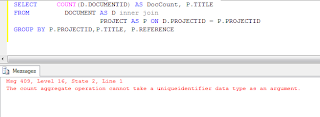
To avoid this error when trying to Count a uniqueidetifier field you have to CAST it into a char :
SELECT COUNT(CAST(D.DOCUMENTID AS char(36))) AS DocCount, P.TITLE
FROM DOCUMENT AS D inner join
PROJECT AS P ON D.PROJECTID = P.PROJECTID
GROUP BY P.PROJECTID, P.TITLE

FROM DOCUMENT AS D inner join
PROJECT AS P ON D.PROJECTID = P.PROJECTID
GROUP BY P.PROJECTID, P.TITLE
When running this query I encountered the following error:
Msg 409, Level 16, State 2, Line 1
The count aggregate operation cannot take a uniqueidentifier data type as an argument.

To avoid this error when trying to Count a uniqueidetifier field you have to CAST it into a char :
SELECT COUNT(CAST(D.DOCUMENTID AS char(36))) AS DocCount, P.TITLE
FROM DOCUMENT AS D inner join
PROJECT AS P ON D.PROJECTID = P.PROJECTID
GROUP BY P.PROJECTID, P.TITLE

Thursday, 29 September 2011
A3 Landscape dashboard layout - SSRS
For A3 Landscape dashboard style settings:
Report Properties:
Grid Spacing 0.2cm
InteractiveSize
Width 42cm
Height 0cm
Margin all 0.5cm
PageSize
Width 42cm
Height 29.7cm
Body Properties:
Size
Width 41cm
Height 28.7cm
Report Properties:
Grid Spacing 0.2cm
InteractiveSize
Width 42cm
Height 0cm
Margin all 0.5cm
PageSize
Width 42cm
Height 29.7cm
Body Properties:
Size
Width 41cm
Height 28.7cm
Monday, 5 September 2011
Resolving Common Connectivity Issues
Useful link to resolving common connectivity issues. Applies to SSAS but also proves to be of use with IIS, SSRS & SQL Server.
http://msdn.microsoft.com/en-us/library/cc917670.aspx
http://msdn.microsoft.com/en-us/library/cc917670.aspx
Subscribe to:
Posts (Atom)