Wednesday, 16 March 2011

Display parameter Label field - SSRS

I was familiar with displaying a parameter's value field by using the expression:
 =Parameters!parameterfield.Value

But in many cases this value will be a key field and pointless to display. The 'Label' field is required and is obtained by simply changing the expression to:
=Parameters!parameterfield.Label

Simple and obvious really!

Wednesday, 9 March 2011

Return a random row - SQL

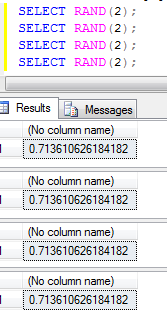
Instead of using the RAND() function which I believe is not truly random since using the same seed value results in the same output:


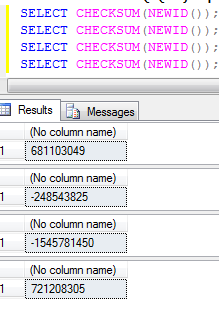
Whereas, CHECKSUM(NEWID()) would work:


and can thus be used to return a random row:


SELECT TOP(1) School.SchoolNameFROM School
ORDER BY CHECKSUM(NEWID());

Tuesday, 15 February 2011

Nob Hill Software - Useful information we can get out of a query execution

Here's a guest article by Nob Hill Software. http://www.nobhillsoft.com/


Much has been written about Query Execution Plans (we’ll call them QEPs), and how they can be used for analyzing how SQL Server interprets your TSQL code and what it does behind the scenes –
information you can use to do such things as find bottlenecks, build indexes where they might help, and generally improve the performance of your code.


Well, we have found more uses for it. There is more information in the QEP, information that’s not typically used, yet is highly useful and very easy to retrieve:

1. IS YOUR CODE BROKEN?

TSQL code can get ‘broken’ all the time. You might be referencing tables or columns that don’t exist.
They might have even existed at the time you wrote the procedure, but have been removed since, leaving your procedure ‘broken’ - It will raise an error next time its executed. How many of those do YOU have in your database?

Now, if a code is broken, SQL Server will let you know about that when attempting to retrieve its execution plan. Strictly speaking, this is not QEP information. Its information you will get while trying to get the QEP. And that is not the only way to get that information. But it’s the easiest.


2. WHAT ENTITIES ARE USED IN FOR WHAT OPERATION?

Among all the logical and physical operations, and effects on memory etc, QEP also contains the very basic information of what entities it is working with, and what it does on such entities. This information can be then used to build a basic ‘browser database’, which you can use to answer questions like: which code inserts to this table? I got data missing… which procedure removes records from here?

In order to get any SQL’s execution plan in SQL Server, all you need to do is:


set SHOWPLAN_ALL on
write your SQL here
set SHOWPLAN_ALL on

If you get an error, this means the stored procedure is broken, and the error would say why.
Otherwise, you can get the execution plan in a tabular format, and retrieve the specific entities used from it.


We put this functionality into one of our freebie products, Diana Lite. You can build the full ‘browser database’ out of the collection of any database’s SQL Code, then easily filter it and get to whatever you are looking for:


Sweet, Huh?
 
http://www.nobhillsoft.com/Freebies.aspx

Wednesday, 19 January 2011

FInd current financial year start and end dates - CR

To find the start date and finish date of the current financial year for subsequent use in various calculations:

Start of year formula:

Local Datetimevar dates := CURRENTDATETIME();
Local Datetimevar startfinancialyear;

IF MONTH(dates) IN [1,2,3]
THEN startfinancialyear := (DATESERIAL (YEAR(dates)-1,4,1))
ELSE startfinancialyear := (DATESERIAL (YEAR(dates),4,1));


End of year formula:
 
Local Datetimevar dates := CURRENTDATETIME();
Local Datetimevar endfinancialyear;

IF MONTH(dates) IN [1,2,3]
THEN endfinancialyear := (DATESERIAL (YEAR(dates),3,31))
ELSE endfinancialyear := (DATESERIAL (YEAR(dates)+1,3,31));


Alteration: The End of year formula gets the last day of the financial year, i.e. 31st March. However, it returns the value for the very start of the day (31/03/xxxx 00:00:00) which when incorporated into a selection formula could potential lead to records logged during that final day being excluded.

A correction would be:

End of year formula (correction):
 
Local Datetimevar dates := CURRENTDATETIME();
Local Datetimevar endfinancialyear;

IF MONTH(dates) IN [1,2,3]
THEN endfinancialyear := DATEADD("s" , -1, (DATESERIAL (YEAR(dates),4,1)))
ELSE endfinancialyear := DATEADD("s" , -1, (DATESERIAL (YEAR(dates)+1,4,1)));

Thus, returning a value of "31/03/xxxx 23:59:59"


(Currently set up for use in the UK)


Tuesday, 4 January 2011

Using the EXCEPT clause wrapped in a CTE - SQL

--
--example EXCEPT clause wrapped in CTE
--
WITH RogueEstab
AS
(
SELECT EstablishmentID FROM Establishment
EXCEPT
SELECT JobLog_EstablishmentID FROM JobLog
)
SELECT RE.EstablishmentID, E.EstablishmentName FROM RogueEstab AS RE
INNER JOIN Establishment AS E
ON RE.EstablishmentID = E.EstablishmentID